tabletop mill educational table top routers wood
metal lathe CNC training VICA TSA CO2 F1 tech
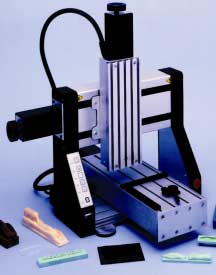
ed benchtop servo technology education router
CAD CAM EDUCATIONAL CNC PROJECTS tech ed
cnc curriculums cnc machine co2 car curricula
At Techno we believe sharing our knowledge
of CNC technology has helped many teachers and students create fun, easy
projects in the classroom. Better yet, some of our best educational
projects have come from you the teachers!
Have you created
a quick-and-easy project for your school's technology program that you
would like to share with others? Complete the following form and we will
place it online, Free of charge, for other teacher's and students to
download:: CNC Projects!
Choose the Free Tech Note or Projects
Below
Basic Start - CNC Servos
Mastercam Inlay
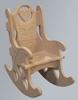
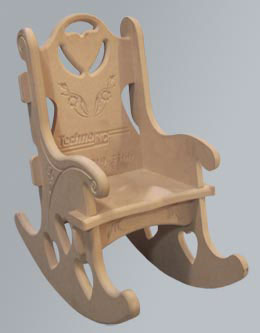
No Glue Rocking Chair
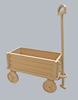
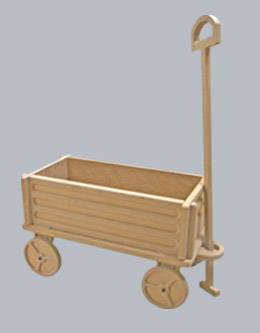
3/4" MDF Wagon
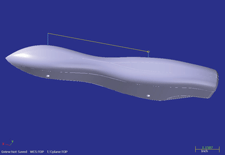
CO2 Cars in Mastercam
Solidworks Designed
CO2
Getting Started Basic cnc servo
systems
Compiled from a few
sections of the "Basic Manufacturing Skills: Introduction to CNC
Machining" this project will provide some basic concepts to get your
students started.
We
advise that you purchase the complete curriculum, part number:
H22T12-HTO0521,for our Intro
to CNC Machining projects, brief history in manufacturing, instructor
resources and more.
DOWNLOAD GETTING STARTED WITH TECHNO CNC TUTORIAL*
Download the file Getting_Started.zip. This
zipped download contains the instructional document as referred above
*Please note this project requires that you have purchased Mastercam
Software prior to
downloading this project. This download does not include the software!
Mastercam
Inlay Tutorial
This tutorial will go through all the steps showing students how-to make
inlays. The tutorial provides a detailed step-by-step set of
instructions for sample geometry - including how-to draw the design,
generate the toolpath in Mastercam, and how-to appropriately
fixture/route the part on Techno CNC servo machines.
The tutorials available are for Mastercam versions X2 and X4, for those
who need X3, the Mastercam X2 instructions are sufficient for use.
Now Available:Inlay Tooling Kit,
$60 P/N:
H25X00-INLAYEDU
Download the file
Inlay_Project_MasterCAMVX2-X4.zip. This zipped download contains the instructional
document as referred above.
*Please note this project requires that you have purchased Mastercam
Software prior to
downloading this project. This download does not include the software!
Create,
route and assemble a rocking chair (approx. 2'x1') in minutes using a
Techno Router and the downloadable Mastercam files below.
Simply secure a flat piece of MDF on a Techno Router, then run the
toolpath files and the Router cuts out the parts, the decorative
carvings and lettering in just a few minutes. The Rocking Chair
assembles without any screws, nails or adhesive.
The best part of this project is that once you learn this basic cut to
fit CNC manufacturing technique, you can expand on that knowledge to
create other projects and assemblies!
DOWNLOAD THE ROCKING CHAIR
Download the file Chair.Zip. This zipped download contains
numerous files, including: setup and material instructions, various
G-code (.nc) and Mastercam files, warning and notes.
Similar to
the popular Rocking Chair, the NEW Techno Wagon downloadable project
expands your skills on a Techno Router, and Mastercam Software.
Just download the .zip files, place a 3/4'' sheet of MDF on a Techno
Router, run the toolpath files, then assemble with 4 Screws and Lock
Nuts. In minutes the Router cuts the parts and carves the wagon design
easily.
The finished project can be painted or stained giving you a great home
decoration or gift idea while expanding your CNC manufacturing
technique.
DOWNLOAD THE
TECHNO WAGON FILE BELOW
Download the file
Wagon4.zip. This zipped download contains numerous files,
including: setup and material instructions, various G-code (.nc) and
Mastercam files, warning and notes.
This
instructional document provides you with the information you need to
create Techno’s classic CO2 Car in MasterCam X. Written by a Techno
Educational Dealer from Midwest Tech, teachers can incorporate new
technology with a fun, creative project.
All you need to
complete this project is a Techno CNC Router, MasterCam X and Techno’s
very own CO2 Curriculum, then download this instructional document and
begin creating your CO2 Cars easily.
This project is great for both novice and beginners and can be used to
create similar CO2 Cars that won
National Championships.
DOWNLOAD
DESIGNING A CO2 CAR IN
MASTERCAM X*
Download the file
MasterCam.zip. This zipped download contains the instructional
document as referred above.
*Please note this project requires that you have purchased the CO2
Fixture and Curriculum for a previous version of MasterCAM prior to
downloading this project. This download does not include the software.
This
instructional document provides you with the information you need to
design Techno’s classic CO2 Car in Solidworks, then create the toolpath
in MasterCam X4.
All you need to
complete this project is a Techno CNC Router, Solidworks, MasterCam X and Techno’s CO2 Curriculum.
You can reference the Designing a CO2 Car Using Mastercam X above
for additional technical information on this project.
DOWNLOAD
CO2 CARS FROM SOLIDWORKS TO MASTERCAM*
Download the file
CO2-SOLID.zip. This zipped download contains the instructional
document as referred above.
*Please note this project requires that you have purchased the CO2
Fixture and Curriculum for a previous version of MasterCAM prior to
downloading this project. This download does not include the software.
Contact
Techno's Educational Sales Manager,
James Renner,
at
JAYME'S E-MAIL
with any inquiries about our Educational
CNC Products.
TECHNO INC.
EDUCATIONAL CNC DIVISION
2101 Jericho Turnpike, Box 5416
New Hyde Park, New York 11042-5416 TEL: 516-595-7495 FAX: 516-595-7498 E-MAIL:TECHNO ED CNC E-MAIL
Techno,
Inc. is celebrating 25 years of CNC and Automation Technology
expertise. Our Educational Division provides industrial quality products
at educational prices with a network of award winning Educators, we can
provide CNC Curriculums, CNC Projects, Technical Information and
Packages for any educational classroom.





 Techno,
Inc. is celebrating 25 years of CNC and Automation Technology
expertise. Our Educational Division provides industrial quality products
at educational prices with a network of award winning Educators, we can
provide CNC Curriculums, CNC Projects, Technical Information and
Packages for any educational classroom.
Techno,
Inc. is celebrating 25 years of CNC and Automation Technology
expertise. Our Educational Division provides industrial quality products
at educational prices with a network of award winning Educators, we can
provide CNC Curriculums, CNC Projects, Technical Information and
Packages for any educational classroom.